
Ready to Get Started?
Read Google Cloud’s Looker AI documentation, or compare the platform editions below.
Overview
Looker is Google Cloud’s business intelligence and embedded analytics platform. Its core is a semantic layer: metrics are defined once in LookML and sit above your cloud data warehouse, so dashboards, AI agents and custom apps all use the same definitions.
Looker’s AI features are powered by Gemini. Conversational Analytics lets business users ask questions in natural language and get answers grounded in the semantic layer, and Dashboard Agents add AI summaries inside dashboards. Gemini also helps users build visualizations, write custom calculations and launch “AI Quick Starts.”
For developers, Looker offers APIs and SDKs, a Conversational Analytics API for multi-turn agent workflows, and a Looker MCP Server. Looker (Google Cloud core) comes in Standard, Enterprise and Embed editions, all priced through Google Cloud sales.
Key Features
LookML Semantic Layer
Define business metrics once in LookML; humans and AI agents query the same governed definitions.
Conversational Analytics
Natural-language questions answered with Gemini, including Dashboard Agents inside dashboards.
Gemini Self-Service
Build visualizations and custom calculations in natural language, and blend CSV files with governed models.
APIs, SDKs and MCP
Looker API, Conversational Analytics API and the Looker MCP Server for agentic workflows.
Embedded Analytics
Embed dashboards and conversational AI in apps with iframes or SDKs.
Google Workspace Integration
Explore LookML-modeled data in Google Sheets through Connected Sheets.
Pros & Cons
Advantages
- Governed, consistent metrics through LookML
- AI answers grounded in the semantic layer
- Strong API, SDK and MCP options for developers
- Close integration with BigQuery and Google Workspace
- Each edition includes a monthly token quota for Conversational Analytics
Disadvantages
- No public prices: platform and user licenses are quoted by sales, with annual commitment
- LookML modeling requires developer skills
- Developer, Standard and Viewer user licenses add pricing complexity
- Conversational Analytics usage beyond the quota may become billable (Google promises 90 days’ notice)
Pricing
Looker pricing has two parts, platform and user licenses, both quoted by Google Cloud sales:
Standard (Contact sales)
For small organizations or teams with fewer than 50 users. One production instance, 10 Standard users and 2 Developer users.
Enterprise (Contact sales)
Enhanced security for internal BI. Up to 100,000 query-based API calls per month.
Embed (Contact sales)
For external analytics and custom applications. Up to 500,000 query-based API calls per month.
User licenses (Developer, Standard, Viewer) are quoted separately, with an annual commitment. Monthly Conversational Analytics data tokens: 60M input on Standard, 300M on Enterprise and 1.2B on Embed.
Best Use Cases
Looker AI Excels For:
- Companies on Google Cloud and BigQuery
- Data teams that want one governed definition of every metric
- Product teams embedding analytics or conversational AI in their apps
- Organizations connecting AI agents to trusted business data through MCP
May Not Be Ideal For:
- Small teams that want transparent self-serve pricing
- Organizations without anyone to build and maintain LookML models
- Teams that only need quick ad hoc charts
Comparison
Looker AI vs Competitors
- vs Power BI Copilot: Power BI publishes per-user prices (Pro at $14/user/month), but Copilot needs a Fabric F2+ or Premium P1+ capacity; Looker is fully quote-based.
- vs Tableau Pulse: Pulse delivers metric digests in Tableau Cloud (from $15/user/month); Looker centers on the LookML semantic layer and APIs.
- vs ThoughtSpot: ThoughtSpot publishes plans from $25/user/month and centers on natural-language search; Looker’s strength is governed modeling.
Screenshots & Interface
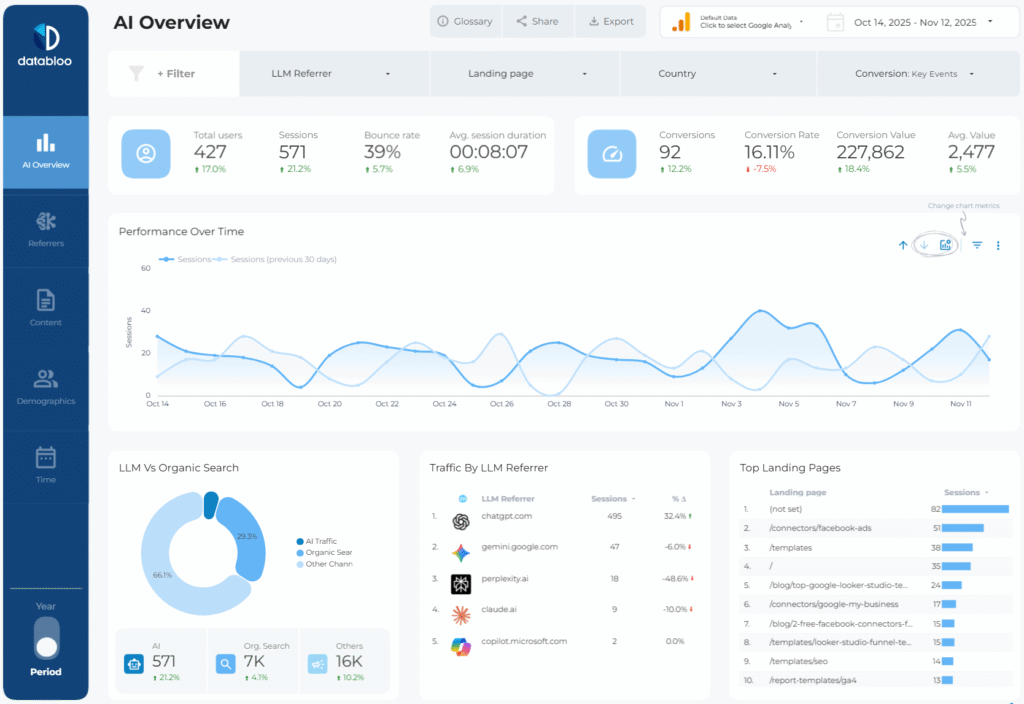
Explore Looker Ai's interface:
Frequently Asked Questions
What is Looker AI?
The Gemini-powered features in Looker, mainly Conversational Analytics, Dashboard Agents and AI help for building visualizations and calculations.
How much does Looker cost?
Google does not publish prices. Platform editions and user licenses are quoted by sales, with an annual commitment.
What is LookML?
Looker’s modeling language. It turns SQL into governed business metrics that every dashboard, app and AI agent reuses.
Can I embed Looker?
Yes. The Embed edition is designed for external analytics, using iframes, SDKs and the Conversational Analytics API.
Does Looker work with AI agents?
Yes. Google offers a Looker MCP Server and a Conversational Analytics API so agents can query governed Looker data.
Final Verdict
Looker is a strong choice for Google Cloud organizations that want governed metrics and AI answers grounded in a semantic layer. The cost of that rigor is LookML work and quote-only pricing.