
Ready to Get Started?
Copilot needs a paid Fabric (F2 or higher) or Power BI Premium (P1 or higher) capacity. Check the requirements before you plan a rollout.
Overview
Copilot in Power BI adds chat-based generative AI to Power BI Desktop and the Power BI service. Business users can ask questions about data and get summaries of reports; report authors can create report pages, write DAX queries and add descriptions to measures; model authors can get design recommendations.
It comes in several forms: the Copilot pane on the right side of reports (generally available), a standalone full-screen Copilot that searches across everything you can access (preview), and Copilot in apps (preview), where app authors can provide verified answers. Prompts can be up to 10,000 characters. Microsoft recommends preparing the semantic model for AI, otherwise answers can be generic or inaccurate.
Copilot is not included with a Power BI Pro or Premium Per User license alone. It requires a paid Fabric capacity (F2 or higher) or Power BI Premium (P1 or higher) in a supported region; trial capacities, free SKUs and sovereign clouds are not supported.
Key Features
Copilot Pane in Reports
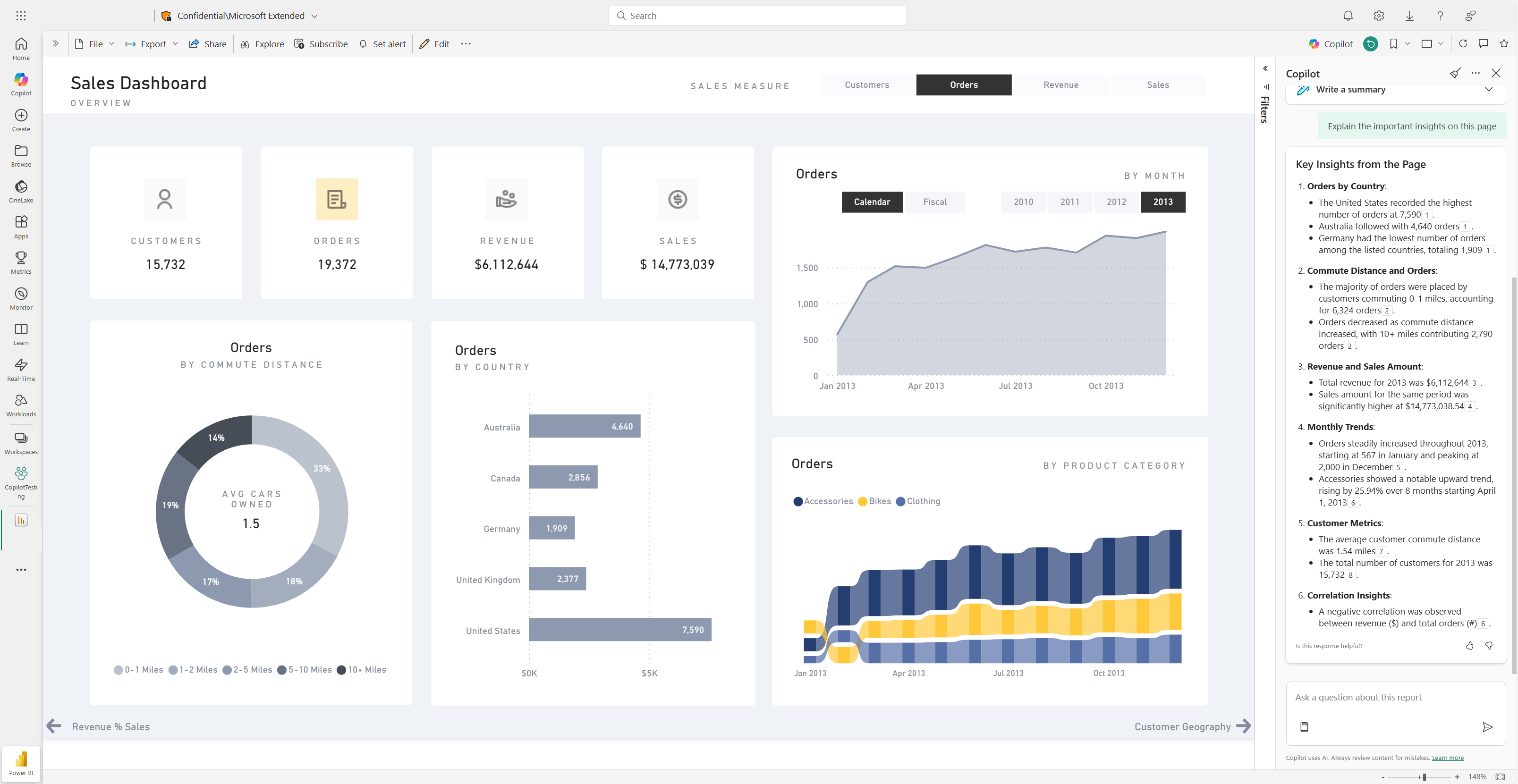
Ask questions about an open report or summarize its key insights (generally available).
Standalone Copilot
Full-screen experience that finds and analyzes any report or semantic model you can access (preview).
Copilot in Apps
App-scoped answers and summaries, with verified answers from app authors (preview).
Report Creation
Create and edit report pages from prompts, and add narrative summary visuals.
DAX and Measure Help
Write DAX queries and generate descriptions for semantic model measures.
Copilot in Web Modeling
Find modeling problems and get best-practice recommendations for semantic models (preview).
Pros & Cons
Advantages
- Built into Power BI Desktop and the Power BI service
- Answers use your semantic model when the question concerns its data
- Helps authors build report pages and write DAX
- App authors can supply verified answers for common questions
- Usage is visible in the Fabric Capacity Metrics app
Disadvantages
- Requires F2+ Fabric or P1+ Premium capacity; Pro or PPU alone is not enough
- Several experiences are still in preview
- Not available in sovereign clouds; standalone Copilot is missing in some regions
- Prompts in languages other than English are not officially supported
- Answer quality depends on how well the semantic model is prepared
Pricing
Copilot has no separate list price; it runs on Power BI and Fabric licensing:
Power BI Pro ($14/user/month, paid yearly)
Needed to publish Power BI content. Does not enable Copilot on its own.
Premium Per User ($24/user/month, paid yearly)
Larger models and more frequent refresh. Does not enable Copilot on its own.
Fabric Capacity (F2 or higher)
Required for Copilot (or Power BI Premium P1+). Variable price; see Microsoft Fabric pricing. Copilot usage consumes capacity units.
A free Power BI account exists, but trial capacities and free SKUs cannot use Copilot.
Best Use Cases
Power BI Copilot Excels For:
- Organizations already paying for Fabric or Power BI Premium capacity
- Report authors who want help with DAX and report pages
- Business users who want summaries and answers from existing reports
- Teams that maintain well-prepared semantic models
May Not Be Ideal For:
- Small teams with only Pro or PPU licenses
- Organizations in sovereign clouds
- Teams that need fully supported non-English prompts
Comparison
Power BI Copilot vs Competitors
- vs Tableau Pulse: Pulse comes with Tableau Cloud (from $15/user/month), but its natural-language Q&A (Tableau Agent) requires Tableau+.
- vs Looker AI: Looker uses Gemini on top of a LookML semantic layer; all Looker pricing is quote-based.
- vs Amazon Quick Sight: Amazon Quick publishes per-user plans, with dashboard authoring on Enterprise at $40/user/month plus a $250 account fee.
Screenshots & Interface
Explore Power Bi Copilot's interface:
Frequently Asked Questions
Do I need a special license for Copilot in Power BI?
Yes. You need a paid Fabric capacity (F2 or higher) or Power BI Premium (P1 or higher). A Pro or PPU license alone is not sufficient.
Is Copilot free in Power BI?
No. Trial capacities and free SKUs are not supported, and Copilot usage consumes Fabric capacity units.
What can Copilot do in Power BI?
Answer questions about your data, summarize reports, create report pages, write DAX queries, describe measures and suggest semantic model improvements.
Does Copilot work in Power BI Desktop?
Yes, if you have write access to a workspace on a paid Fabric or Premium capacity.
Does Copilot support languages other than English?
Not officially. Microsoft says non-English prompts may occasionally work but are not officially supported.
Final Verdict
Copilot is a useful assistant for organizations already on Fabric or Premium capacity, especially for report authors writing DAX. For teams on Pro licenses only, the capacity requirement is the real cost to plan for.