
Overview
TestFit is a cloud-based computational design platform that combines parametric design with an open marketplace of reusable building blocks. Launched in 2015, it has attracted over 15,000 users who appreciate its unique approach to architectural automation—creating configurable building tools that can be chained together to build complex workflows.
Unlike traditional parametric tools that require deep programming knowledge, TestFit provides a visual interface where architects can combine pre-built "functions" (like space planning algorithms, structural systems, or facade generators) to create custom design solutions. The platform's API-first architecture makes it particularly appealing to tech-savvy firms looking to automate repetitive design tasks.
What makes TestFit stand out is its marketplace model. Developers can create and share building configurators that other architects can use directly in their projects. This creates a growing ecosystem of design intelligence that becomes more valuable over time—similar to how app stores work for mobile platforms.
Open Marketplace
TestFit's marketplace contains dozens of ready-to-use building configurators for everything from parking layouts to MEP routing. Use them as-is or combine them to create custom workflows.
Key Features
Building Configurators
Pre-built parametric design tools for common building types. Configure apartment layouts, parking structures, and more through simple interfaces.
📐 Parametric Design
Visual programming environment for creating custom design automation. No coding required for basic workflows, with full API access for advanced users.
Cloud Collaboration
Fully cloud-based platform enables real-time collaboration. Share configurations and results with team members instantly.
Design Automation
Automate repetitive design tasks with custom workflows. Chain together multiple functions to create sophisticated design pipelines.
API Integration
RESTful API allows integration with existing tools and custom applications. Build your own interfaces on top of TestFit's geometry engine.
Real-time Costing
Integrated cost estimation based on design parameters. Understand budget implications as you design, not after.
Geometry Engine
Powerful cloud-based 3D geometry processing. Handle complex calculations without taxing local hardware resources.
🛒 Open Marketplace
Browse and use community-created configurators. Contribute your own tools and monetize architectural software solutions.
Pros & Cons
Advantages
- Innovative marketplace model
- Cloud-based collaboration
- No local software installation
- API-first architecture
- Free tier available
- Growing library of configurators
- Excellent for automation
- Real-time cost estimation
- Developer-friendly platform
- Active community
Disadvantages
- Steep learning curve for advanced features
- Limited marketplace content currently
- Requires internet connection
- Not as mature as traditional BIM tools
- Visual programming can be complex
- Best for specific building types
- Integration with CAD limited
- Smaller user community than established tools
Pricing
TestFit offers transparent pricing with a free tier for exploration and learning.
Free
For learning and personal projects
- Unlimited model creation
- Access to marketplace
- Basic export formats
- Community support
- Limited compute resources
Professional
For practicing architects
- Everything in Free
- Priority compute resources
- Advanced export options
- Commercial use license
- Priority support
- Custom branding
Team
For design firms
- Everything in Professional
- Team collaboration tools
- SSO and admin controls
- Private marketplace
- Custom development support
- Dedicated account manager
Comparison with Alternatives
| Feature | TestFit | Finch 3D | TestFit |
|---|---|---|---|
| Cloud-Based | Fully | Yes | Yes |
| API Access | Full API | Limited | No |
| Marketplace | Open | No | No |
| Learning Curve | Moderate | Steep | Easy |
| Free Tier | Available | Available | Paid only |
Best Use Cases
Office Buildings
Space planning automation
Parking Structures
Layout optimization
Multi-Family
Unit layout generation
Design Automation
Repetitive task elimination
Tech-Savvy Firms
Custom tool development
Research Projects
Computational design studies
Pricing
Flexible pricing options for different needs:
Free Plan
Basic features with limitations
Pro/Plus
$10-25/month for individuals
Team/Business
$15-40/user/month for teams
Enterprise
Custom pricing for large organizations
Annual Savings
20-40% discount on annual plans
Free Trial
Test all features risk-free
Best Use Cases
Ideal For:
- Professionals: Individuals seeking enhanced productivity and efficiency
- Teams: Collaborative environments requiring coordination
- Enterprises: Large organizations with complex workflows
- Remote Workers: Distributed teams needing communication tools
- Startups: Growing companies scaling operations
- Specific Industries: Healthcare, architecture, education, etc.
May Not Be Ideal For:
- Users with very basic requirements
- Organizations with strict data residency needs
- Teams unwilling to adopt new workflows
Comparison
Platform Evaluation
Key Strengths
- Advanced AI capabilities
- Intuitive user experience
- Strong integration ecosystem
- Regular feature updates
Competitive Edge
- Market-leading position
- Proven track record
- Excellent support
- Active community
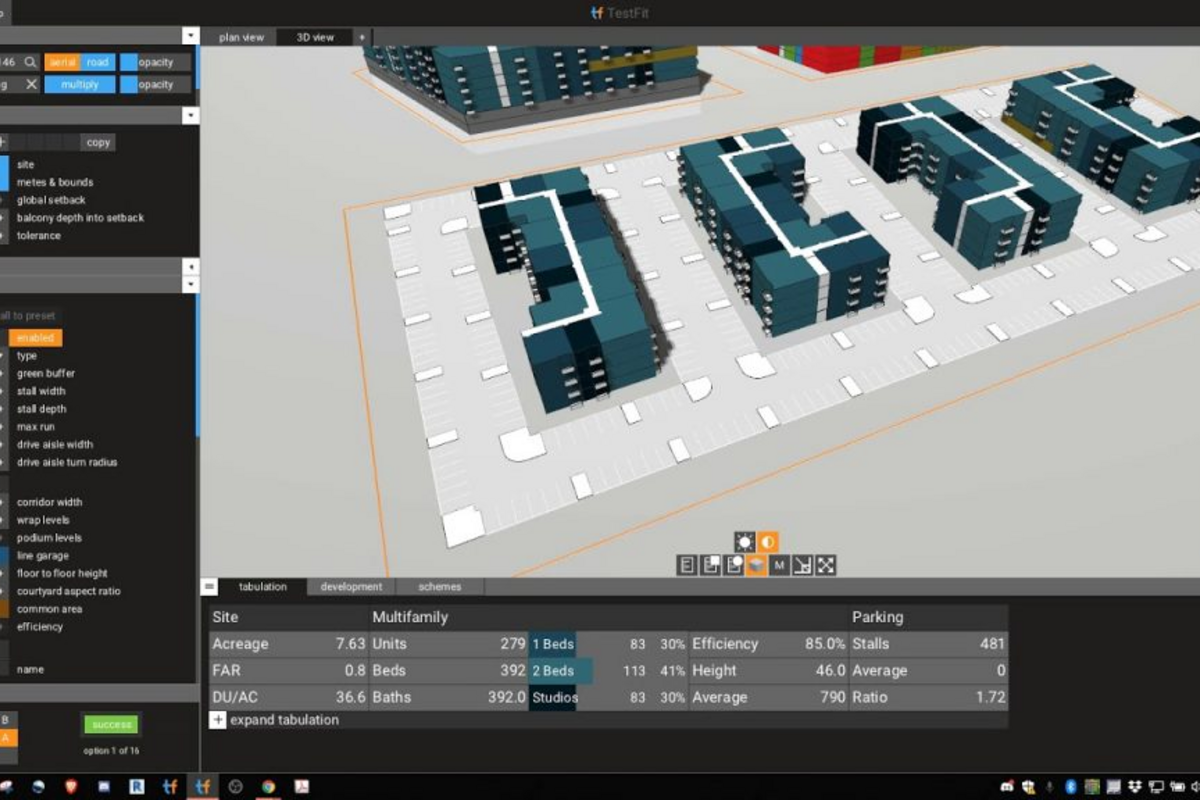
Screenshots & Interface
Explore Testfit's interface:
Frequently Asked Questions
What are the main pricing tiers?
Typical tiers include free (limited features), individual/pro ($10-25/month), team/business ($15-40/user/month), and enterprise (custom pricing).
Is there a free version available?
Most platforms offer a free tier with basic features. Premium tiers unlock advanced capabilities, higher usage limits, and priority support.
How does it integrate with other tools?
Integrations typically include popular productivity tools, communication platforms, project management systems, and industry-specific software.
What kind of support is provided?
Support ranges from community forums and documentation (free tier) to email support (paid), and dedicated account managers (enterprise).
Can I try before committing?
Yes, free trials or freemium models allow testing features before purchasing. Trial periods typically range from 7-30 days.
Final Verdict
TestFit represents the future of computational design—a marketplace of reusable building intelligence. While it requires more technical know-how than traditional tools, the payoff is enormous for firms that invest in learning it. The API-first approach and open marketplace make it ideal for forward-thinking practices looking to build competitive advantages through design automation. Highly recommended for tech-savvy architects and developers.