
Try It Now
Overview
Descript is revolutionizing audio and video editing by treating media like text documents. Instead of working with traditional timeline-based editing, you edit transcripts and the media automatically updates. This approach makes editing accessible to non-professionals while remaining powerful enough for seasoned creators.
What truly sets Descript apart is its AI-powered Overdub feature, which can clone your voice and generate speech in your own voice. Combined with industry-leading transcription accuracy, collaborative editing, screen recording, and a suite of AI tools for removing filler words and background noise, Descript has become the go-to platform for podcasters, YouTubers, and content creators.
Key Features
Text-Based Editing
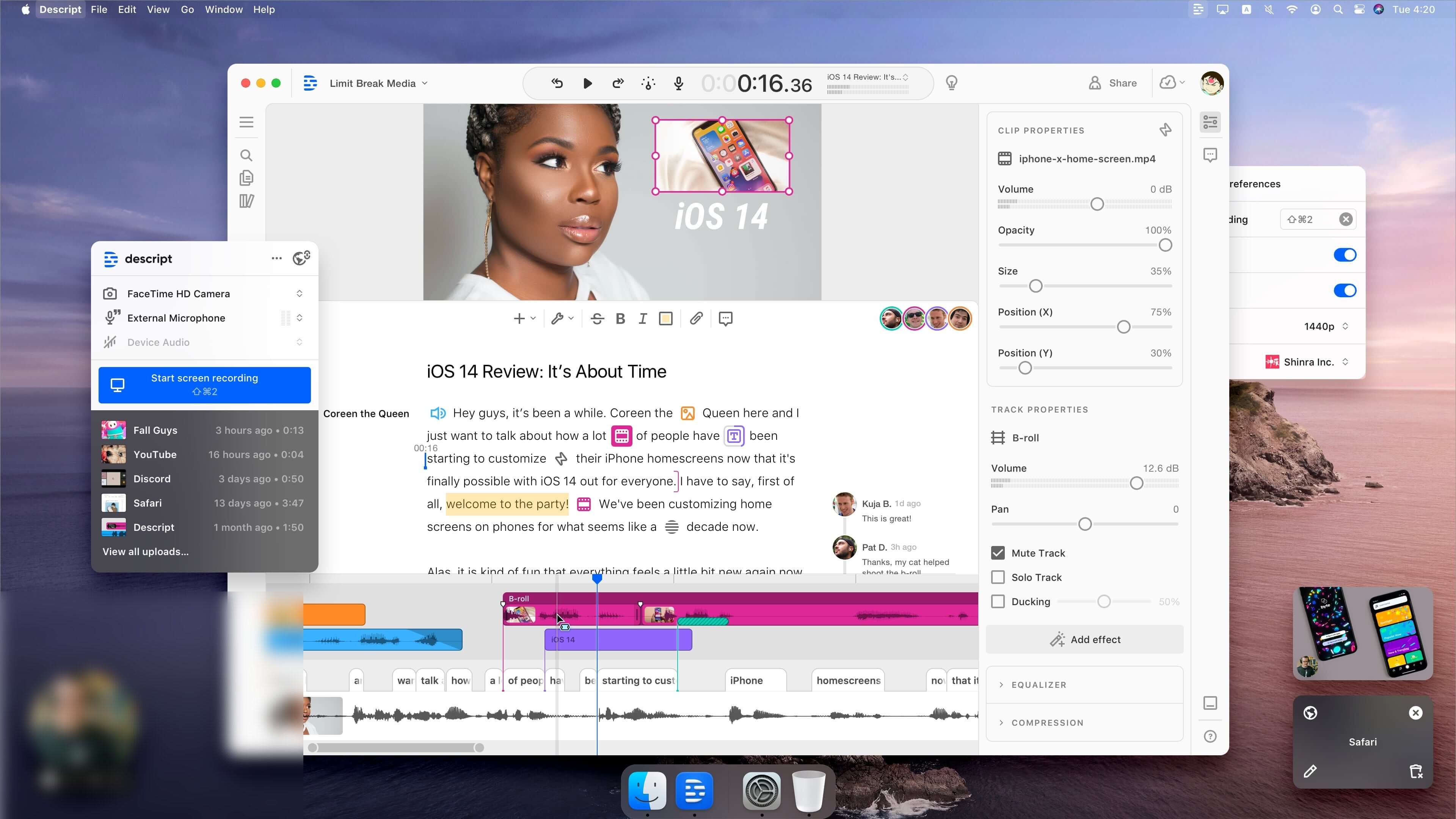
Edit audio and video by editing the transcript. Delete words, rearrange sentences, and the media updates automatically.
Overdub Voice Cloning
Create an AI clone of your voice. Type text and generate natural speech in your own voice for corrections and additions.
Studio Sound
AI-powered audio enhancement that removes background noise, improves clarity, and makes recordings sound professionally produced.
Filler Word Removal
Automatically detect and remove "um," "uh," and other filler words with one click. Perfect for polishing podcasts and videos.
Screen Recording
Built-in screen recorder with automatic transcription. Great for tutorials, demos, and educational content.
Collaboration Tools
Real-time collaboration with comments, shared projects, and version history. Work with teams seamlessly.
Multitrack Editing
Full multitrack audio editing with effects, EQ, compression, and traditional DAW features when you need them.
Video Editing Suite
Trim, crop, add captions, insert images, and create complete videos without leaving the platform.
Additional Features
- Automatic Transcription: Industry-leading accuracy with speaker detection and timestamps
- Eye Contact Correction: AI adjusts your gaze to look directly at the camera in video recordings
- Green Screen: Remove backgrounds from videos without physical green screens
- Templates: Pre-built templates for social media, podcasts, and video intros
- Publishing: Direct publishing to YouTube, social media, and podcast platforms
- API Access: Automate workflows and integrate with other tools
Pros & Cons
Advantages
- Revolutionary text-based editing approach
- Outstanding voice cloning with Overdub
- Best-in-class transcription accuracy
- Intuitive interface for beginners
- Powerful AI audio enhancement tools
- Built-in screen recording
- Real-time collaboration features
- One platform for audio and video
- Generous free tier
- Regular feature updates
Disadvantages
- Expensive for heavy users
- Limited to 1 hour on free plan
- Desktop app can be resource-intensive
- Video editing less advanced than Premiere
- Learning curve for advanced features
- Overdub requires training time
- Export times can be slow for long videos
- Limited mobile functionality
Pricing Plans
| Plan | Price | Transcription Hours | Key Features |
|---|---|---|---|
| Free | $0 | 1 hour/month | Text-based editing, basic features, watermarked exports |
| Hobbyist | $12/month | 10 hours/month | No watermark, Studio Sound, screen recording, 720p export |
| Creator | $24/month | 30 hours/month | Overdub, filler word removal, 4K export, green screen |
| Business | $40/user/month | Unlimited | Team collaboration, priority support, API access, advanced admin |
Best Use Cases
Descript Excels At:
- Podcast Editing: Remove filler words, enhance audio quality, and export ready-to-publish episodes
- YouTube Videos: Create videos with captions, b-roll, and polished audio in one platform
- Interview Transcription: Generate accurate transcripts with speaker labels and timestamps
- Course Creation: Record screen tutorials with automatic captions and easy editing
- Social Media Content: Quickly create short clips with captions for Instagram, TikTok, and LinkedIn
- Voice Corrections: Fix mistakes without re-recording using Overdub
- Team Collaboration: Work with remote teams on video and audio projects
May Not Be Ideal For:
- Professional music production (use DAWs like Logic or Ableton)
- Complex video effects and color grading (use Premiere or DaVinci Resolve)
- Real-time live streaming
- Heavy users on budget (transcription hours add up quickly)
Comparison with Competitors
| Feature | Descript | Adobe Audition | Riverside.fm |
|---|---|---|---|
| Text-Based Editing | Yes | No | Basic |
| Voice Cloning | Overdub | No | No |
| Transcription | Automatic | No | Yes |
| Video Editing | Yes | No | Yes |
| Collaboration | Real-time | Limited | Yes |
| Learning Curve | Easy | Steep | Easy |
| Price (Pro) | $24/month | $23/month | $24/month |
Screenshots & Interface
Explore Descript's interface:
Final Verdict
Our Recommendation
Descript is a game-changer for content creators who prioritize speed and ease of use. Its text-based editing makes it incredibly accessible, while features like Overdub and Studio Sound bring professional-grade AI capabilities to everyone. While the pricing can add up for heavy users and it may not replace specialized tools for advanced production, Descript's unique approach and comprehensive feature set make it the best all-in-one solution for podcasters, YouTubers, and modern content creators. The free tier is perfect for trying it out, and the Creator plan at $24/month offers excellent value for serious creators.