Try It Now
Overview
Looker, now part of Google Cloud, is a modern business intelligence and data analytics platform that transforms how organizations explore, analyze, and share data insights. Unlike traditional BI tools, Looker uses a unique semantic modeling layer (LookML) that defines business logic once and makes it reusable across all analyses, ensuring consistency and governance at scale.
What sets Looker apart is its data-driven approach. Instead of moving data into a separate analytics database, Looker queries data directly where it lives—leveraging the power of modern cloud data warehouses like BigQuery, Snowflake, and Redshift. This architecture provides real-time insights without data duplication and scales effortlessly with your data volume.
Key Features
Data Visualization
Interactive dashboards and reports with drag-and-drop interface for powerful visual analytics.
Data Exploration
Intuitive tools for discovering insights and patterns in your data without SQL knowledge.
AI-Powered Insights
Automated anomaly detection, trend analysis, and predictive analytics using machine learning.
Advanced Analytics
Statistical modeling, forecasting, and what-if scenario planning for data-driven decisions.
Data Connectors
Connect to 100+ data sources including databases, cloud platforms, and enterprise applications.
Collaboration Tools
Share dashboards, create data stories, and enable organization-wide data democratization.
Pros & Cons
Advantages
- Powerful visualization capabilities
- Intuitive user interface
- Extensive data source connectors
- Strong community and resources
- Scalable for enterprise deployments
- AI-powered insights and automation
- Mobile analytics support
- Regular product updates
Disadvantages
- Can be expensive for full features
- Learning curve for advanced features
- Performance issues with very large datasets
- Requires planning for optimal architecture
- Some features locked to enterprise tier
- Complex pricing structure
Pricing Plans
| Plan | Price | Features |
|---|---|---|
| Professional | Contact Sales | Core analytics features, standard support |
| Enterprise | Contact Sales | Advanced features, premium support, SLA |
| Custom | Custom Pricing | Tailored solutions for large organizations |
Contact Looker sales team for detailed pricing based on your organization's needs.
Best Use Cases
Looker Excels At:
- Business Intelligence: Comprehensive data analysis and reporting
- Data Visualization: Interactive dashboards and visual analytics
- Enterprise Analytics: Large-scale data processing and insights
- Team Collaboration: Shared analytics and decision-making
- Data Exploration: Self-service analytics for business users
May Not Be Ideal For:
- Small businesses with limited budgets
- Simple reporting needs
- Organizations without dedicated data teams
How It Compares
Looker is a leading business intelligence and analytics platform that competes with tools like Power BI, Tableau, and Qlik. It offers powerful data exploration capabilities, robust integrations, and enterprise-grade features. The platform is particularly strong in cloud-based analytics and collaboration features.
Compared to competitors, Looker provides excellent scalability and is well-suited for organizations already using Google Cloud or similar ecosystems. The pricing is typically enterprise-focused with custom quotes based on organization size and requirements.
Final Verdict
Our Recommendation
Looker is an excellent choice for organizations seeking powerful business intelligence capabilities. Its combination of ease of use, advanced features, and enterprise scalability make it suitable for businesses of all sizes. The platform excels at making complex data accessible to business users while providing the depth needed for data professionals. Consider Looker if you prioritize user adoption, visual analytics, and AI-powered insights for data-driven decision making.
Screenshots & Interface
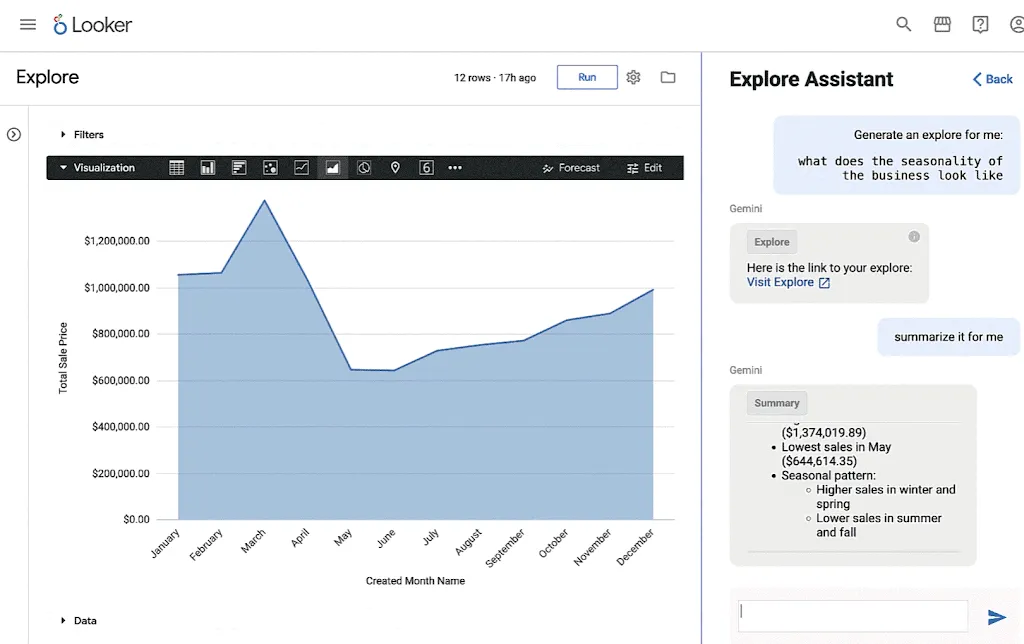
Explore Looker's interface: