
Overview
Amazon CodeWhisperer is AWS's answer to GitHub Copilot, offering AI-powered code generation with a unique focus on security and AWS service integration. Launched in 2023, it provides free individual tier access, making it an attractive option for developers who want AI assistance without a subscription fee.
What distinguishes CodeWhisperer from competitors is its built-in security scanning that identifies vulnerabilities as you code, and its reference tracking feature that tells you when suggestions match open-source code — helping you manage licensing requirements. For AWS developers, it's particularly valuable because it understands AWS APIs better than any competitor.
While CodeWhisperer supports fewer languages than GitHub Copilot (15 vs 100+), it excels in its core supported languages: Python, Java, JavaScript, TypeScript, C#, Go, Rust, PHP, Ruby, Kotlin, SQL, C, C++, shell, and Scala. For AWS-heavy workloads, it's often the best choice.
AWS Integration Advantage
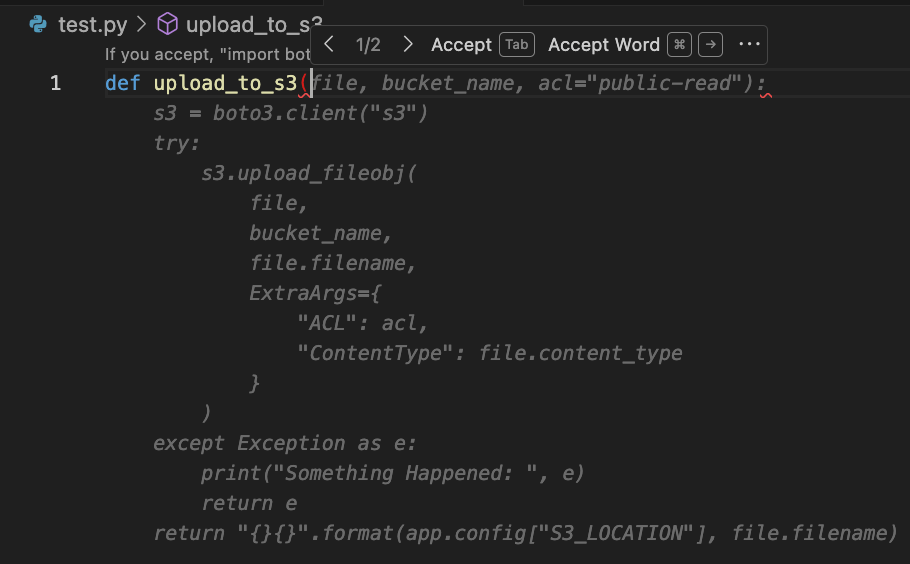
CodeWhisperer understands AWS services deeply. When you're writing Lambda functions, DynamoDB queries, S3 operations, or any AWS API calls, it provides remarkably accurate suggestions that follow AWS best practices.
Key Features
Security Scanning
Built-in security scanning identifies vulnerabilities in your code as you write, including OWASP Top 10 issues, hardcoded credentials, and insecure patterns.
Reference Tracking
Unique feature that flags when suggestions match open-source code, showing the repository URL and license so you can make informed decisions.
AWS Optimized
Deep understanding of AWS services means better suggestions for Lambda, DynamoDB, S3, EC2, and other AWS APIs with proper error handling.
Free Individual Tier
Unlike GitHub Copilot, CodeWhisperer offers a free tier for individual developers with no time limits or credit card required.
Amazon Q Chat
Integrated chat assistant (Amazon Q) for asking questions about AWS, debugging code, and getting explanations.
Enterprise Ready
Professional tier includes customization options, SSO integration, and the ability to exclude specific repositories from training.
Cross-File Context
Understands context from other open files in your project to provide more relevant suggestions.
Infrastructure as Code
Excellent support for CloudFormation, Terraform, and CDK with accurate resource configurations.
Pros & Cons
Advantages
- Free for individual developers
- Built-in security vulnerability scanning
- Best-in-class AWS service suggestions
- Reference tracking for license compliance
- Works in Lambda console directly
- Amazon Q chat integration
- No code sent to train models (optout available)
- Supports Infrastructure as Code
- Enterprise features for teams
- Good Python and Java support
Disadvantages
- Only 15 supported languages
- Less accurate than Copilot for general code
- Requires AWS account (even free tier)
- Fewer IDE options than competitors
- AWS-centric — less useful for non-AWS work
- Slower suggestions than Copilot
- Limited multi-file editing
- Amazon Q chat less capable than Copilot Chat
Pricing Plans
CodeWhisperer offers a generous free tier that's fully functional for individual developers. The Professional tier adds enterprise features and removes usage limits.
| Plan | Price | Features | Best For |
|---|---|---|---|
| Individual | Free | Code suggestions, security scan (50/mo), reference tracking, Amazon Q | Solo developers |
| Professional | $19/user/mo | Everything free + unlimited security scans, admin controls, SSO, customization | Teams & Enterprise |
Screenshots
Best Use Cases
AWS Development
Lambda, DynamoDB, S3, EC2 code
Security-Focused
Teams needing vulnerability scanning
License Compliance
Track open-source references
Infrastructure as Code
CloudFormation, Terraform, CDK
Budget Teams
Free tier for small teams
Python/Java Devs
Strong support for main languages
Pricing
Flexible pricing for individuals and teams:
Free Tier
Limited features to get started
Individual/Pro
$10-30/month for professionals
Team
$20-50/user/month for teams
Enterprise
Custom pricing for organizations
Annual Discounts
Save 20-40% with annual billing
Free Trial
Try before you buy
Best Use Cases
Ideal For:
- Professionals: Individuals seeking productivity enhancements
- Teams: Collaborative work requiring quality and speed
- Content Creators: Bloggers, marketers, writers
- Businesses: Companies scaling content production
- Agencies: Service providers managing multiple clients
- Developers/SEOs: Technical professionals optimizing workflows
May Not Be Ideal For:
- Casual users with minimal needs
- Budget-constrained individuals
- Teams not needing collaboration
Comparison
Platform Overview
Key Strengths
- Powerful AI capabilities
- User-friendly interface
- Regular updates and improvements
- Strong customer support
Market Position
- Leading solution in category
- Large user base
- Proven ROI
- Continuous innovation
Frequently Asked Questions
What's included in the free plan?
Free plans typically include basic features with usage limitations. Paid plans unlock advanced capabilities, higher limits, and priority support.
How does pricing compare to alternatives?
Pricing is competitive with similar tools, offering good value for the feature set. Team and enterprise plans provide volume discounts.
Can I cancel anytime?
Yes, subscriptions can typically be cancelled anytime. Monthly plans offer more flexibility, while annual plans provide cost savings.
What integrations are available?
Integrations include popular tools like VS Code, Chrome, WordPress, Google Docs, and many others depending on the category.
Is there customer support?
Yes, email support is standard. Higher tiers often include priority support, live chat, and dedicated account management.
Final Verdict
Amazon CodeWhisperer is the best choice for AWS developers. Its deep integration with AWS services, free tier, and unique security scanning features make it invaluable for cloud-native development. While it lacks the breadth of GitHub Copilot, it excels in its niche. If you're building on AWS, CodeWhisperer should be in your toolkit.