
Ready to Get Started?
Install Lavender's free email coach.
Overview
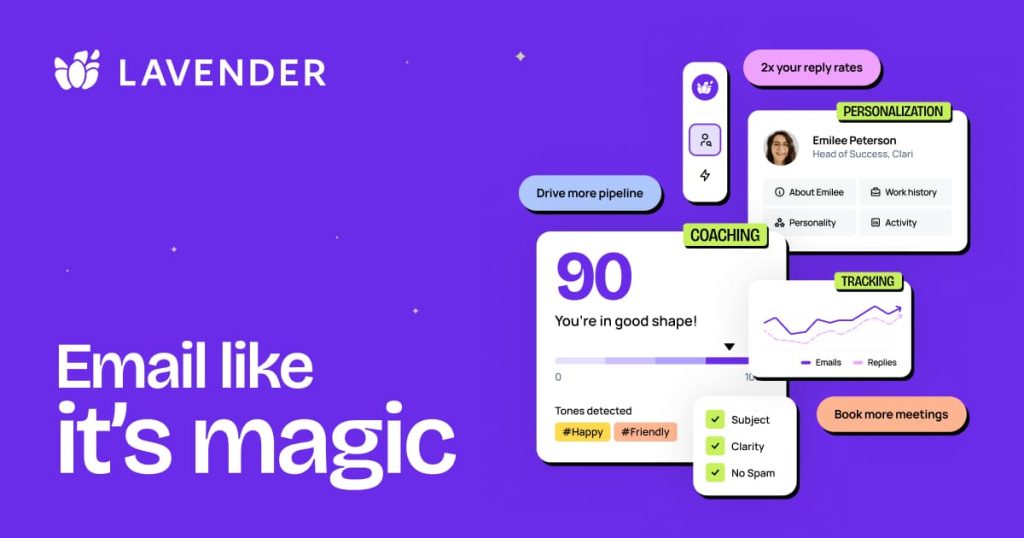
Lavender is an AI email coach for salespeople. It analyzes your historic emails to learn what works for you and your team, then scores new drafts and flags issues that could lower reply rates.
The Personalization Assistant pulls prospect data into the inbox to suggest personalization, and managers get a Coaching Dashboard to track team performance and ROI. Lavender also offers Ora, which it describes as its new AI sales agent for drafting emails, plus free training such as its Sales Email Certification.
The coach installs as a Chrome extension and works in Gmail and Outlook 365. Paid plans integrate with Outreach, Salesloft, Groove, HubSpot, Apollo and Gong. Plans range from a free Basic tier to a Team Plan with the Coaching Dashboard.
Key Features
Email Scoring
Scores emails and templates and flags issues that could lower reply rates.
Personalization Assistant
Brings prospect data into your inbox and suggests personalization.
Real-Time Coaching
Coaching that updates as email best practices change.
Coaching Dashboard
Lets managers track team performance, ROI and activity.
AI Email Writer
Drafts emails, alongside AI recommendations, in the paid plans.
Ora
Lavender's AI sales agent for drafting outreach.
Pros & Cons
Advantages
- Free Basic plan, plus a 7-day free trial of the Coach with all integrations and no credit card
- Published pricing from $27/month
- Works in Gmail and Outlook 365 and with major sales engagement tools
- Free access program for students, job seekers and bootstrapped entrepreneurs
- Team Plan adds a manager dashboard
Disadvantages
- Free plan limited to 5 email analyses and 5 personalizations per month
- Integrations require Individual Pro or higher
- Focused on email; no calling or pipeline management
- Installing the extension may need IT review
Pricing
Prices from lavender.ai, billed annually (monthly billing in brackets).
Basic (Free)
Free forever: analyze 5 emails and personalize 5 emails per month.
Starter ($27/mo)
For individuals. $29/month billed monthly.
Individual Pro ($45/mo)
Includes integrations. $49/month billed monthly.
Team Plan ($89/seat/mo)
Integrations plus the Coaching Dashboard. $99/seat/month billed monthly.
A 7-day free trial of the Email Coach includes all integrations; no credit card required.
Best Use Cases
Lavender Excels For:
- SDRs and AEs who write many cold emails
- Sales managers coaching email quality across a team
- Reps who send sequences from Outreach, Salesloft or HubSpot
- Students and job seekers (free access program)
May Not Be Ideal For:
- Teams whose outreach is mostly by phone
- Organizations that block Chrome extensions
- Teams that need a full sales engagement platform
Comparison
Lavender vs Competitors
Key Differences
- Coaches the person writing the email rather than automating sends
- Works on top of engagement tools such as Outreach and Salesloft
- Low, published per-user pricing
Alternatives to Consider
- Regie.ai: AI prospecting workspace with messaging, agents and a dialer
- Apollo.io: contact data and outreach with an AI assistant
- Outreach: full sales engagement platform with AI agents
Screenshots & Interface
Explore Lavender's interface:
Frequently Asked Questions
Is Lavender free?
Yes. The Basic plan is free forever and lets you analyze 5 emails and personalize 5 emails per month.
Which email clients does Lavender support?
Gmail and Outlook 365, through a Chrome extension.
Which sales tools does Lavender integrate with?
Outreach, Salesloft, Groove, HubSpot, Apollo and Gong. Integrations start with the Individual Pro plan.
Is there a free trial?
Yes. A 7-day free trial of the Email Coach includes all integrations and needs no credit card.
What is Ora?
Lavender describes Ora as its new AI sales agent, which drafts emails. The ora.im domain redirects to lavender.ai/ora.
Final Verdict
Lavender does one job well: coaching reps to write better sales emails in Gmail and Outlook. Pricing is public and low, with a free tier and a 7-day trial, so it is easy to test before rolling it out to a team.