
Try It Now
The Lite plan is free forever for one user. Reclaim also advertises a 14-day free trial of its paid features.
Overview
Reclaim.ai is an AI calendar assistant that works on top of Google Calendar and Outlook Calendar. It schedules tasks, recurring habits, focus time, breaks and meetings into your existing calendar, and moves them as priorities and meetings change.
Its features include Focus Time (a weekly focus goal that Reclaim defends), Habits (recurring events that flex to find time), Tasks scheduled by priority, Smart Meetings that find times across attendees, Scheduling Links as an alternative to Calendly, Calendar Sync to block time across calendars, Buffer Time, and pre-built AI agents, for example to protect deep-work time or detect meeting overload. Time tracking and workforce analytics show where time goes.
Dropbox acquired Reclaim in 2024, and Reclaim continues as its own product. It is sold per seat in four plans: Lite (free), Starter, Business and Enterprise.
Key Features
Focus Time
Set a weekly focus goal and Reclaim reserves and defends the time on your calendar.
Habits
Recurring routines that move to the best available slot instead of staying fixed.
Tasks
Schedules tasks onto your calendar by priority, with task-app integrations.
Smart Meetings
Finds meeting times across attendees' schedules.
Scheduling Links
Booking links to share your availability, positioned as a Calendly alternative.
Calendar Sync
Blocks availability across work and personal calendars to prevent double-booking.
Buffer Time
Adds breaks, prep time and follow-up time around meetings.
AI Agents and Analytics
Pre-built agents (deep-work protection, meeting overload detection) plus time tracking and workforce analytics.
Pros & Cons
Advantages
- Works on your existing Google or Outlook calendar
- Free Lite plan
- Habits and focus time move automatically around meetings
- Scheduling links included on every plan
- Calendar sync across work and personal calendars
Disadvantages
- Lite is limited to 1 user, a 1-week scheduling range, 1 calendar sync and 1 scheduling link
- Supports Google Calendar and Outlook Calendar only
- Starter is capped at 10 seats and Business at 100
- SSO and SCIM only on Enterprise ($22 per seat per month, yearly only)
- Webhooks start on the Business plan
Pricing Plans
| Plan | Price | Includes |
|---|---|---|
| Lite | Free | 1 user, 1-week scheduling range, 1 calendar sync, 1 scheduling link, 5 AI agents, limited integrations |
| Starter | $10/seat/mo billed yearly ($12 monthly) | Up to 10 seats, 8-week scheduling range, scheduling links and calendar sync, 10 AI agents per seat, unlimited integrations |
| Business | $15/seat/mo billed yearly ($18 monthly) | Up to 100 seats, 12-week range, unlimited calendar syncs and scheduling links, 100 AI agents per seat, webhooks, Team OOO calendar, delegated access |
| Enterprise | $22/seat/mo billed yearly | 100+ seats, unlimited AI agents, SSO and SCIM provisioning, org-chart-aware scheduling |
Yearly billing saves 20%. Reclaim often runs time-limited discounts; the prices above are its list prices.
Screenshots & Interface
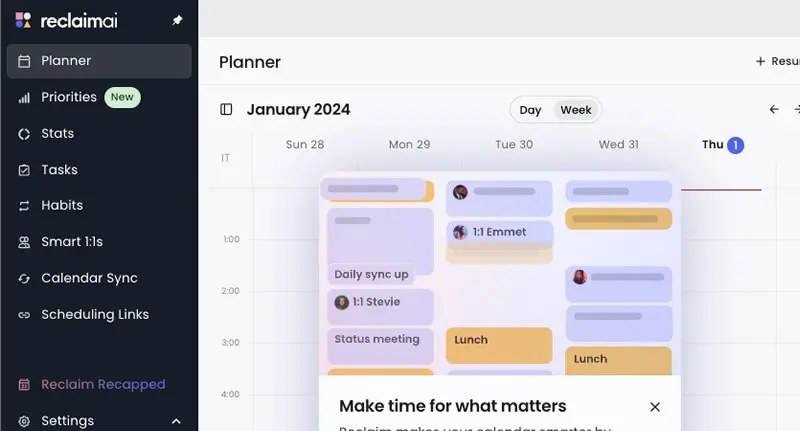
Reclaim's scheduling interface:
Best Use Cases
Reclaim.ai Excels At:
- Professionals protecting focus time on a busy calendar
- Teams on Google Workspace or Microsoft 365 calendars
- Executive assistants managing other people's calendars (delegated access on Business)
- Teams scheduling recurring meetings across many attendees
May Not Be Ideal For:
- People who use a calendar other than Google or Outlook
- Teams looking for a full project management tool
- Organizations that need SSO without moving to Enterprise
How It Compares
Reclaim.ai vs. Alternatives
- vs. Motion: Motion is a full task and project app built around its own AI calendar, with no free plan (from $19 per seat per month, billed annually). Reclaim layers onto Google or Outlook and has a free plan.
- vs. Calendly: Reclaim's Scheduling Links cover booking pages, bundled with task, habit and focus-time scheduling.
- vs. ClickUp AI: ClickUp is a work platform with projects, docs and chat; Reclaim focuses on the calendar.
Final Verdict
Our Recommendation
Reclaim.ai is a low-risk way to add AI scheduling to the calendar you already use: the free Lite plan is enough to see whether automatic habits and focus time suit you, and paid seats are inexpensive. It stays a calendar tool rather than a project manager, and it supports only Google and Outlook calendars.